Reuse course answers for your next class
Instructors turn recurring questions into searchable answers for their next class. The learner gives permission, the instructor approves the wording, and the original conversation stays private.
For instructors who teach the same course to different groups
Read a sample lesson Enquire about school access
The sample is free and needs no account. School access and pricing are by enquiry; there is no instant signup or checkout.
Course Question Library · Product walkthrough
From a private question to a searchable course answer
Real app screenshots using fictional examples. Open a screenshot for a closer look.
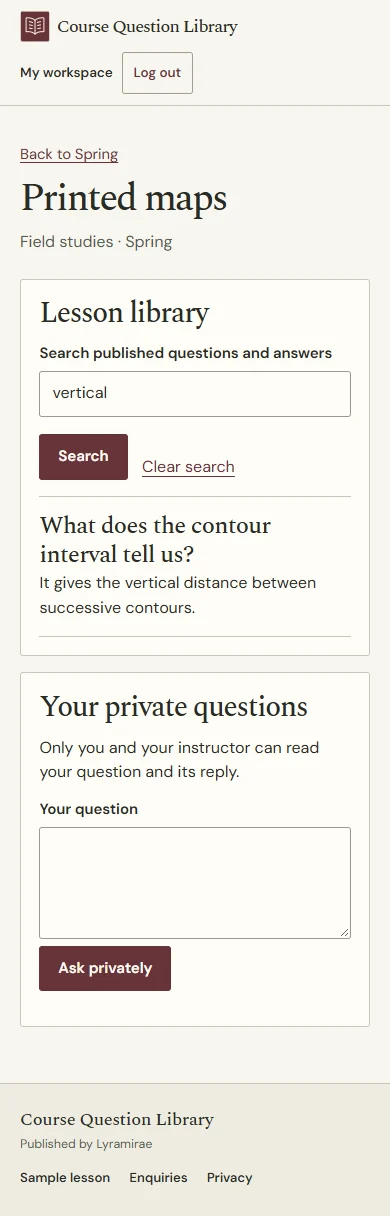
- A learner asks in the source lesson and receives a private reply.
- If it could help a named future cohort, request permission and edit the reusable answer.
- The instructor approves that exact wording. The receiving cohort searches the published answer, not the original thread.
Does the next cohort see the private discussion?
No. Only the edited answer is published after approval. The original exchange stays separate. The walkthrough below uses fictional examples.
Cohort 04 / finding the next exercise
Fictional example.
Learner question: Which exercise should I repeat before the next module?
Reviewed answer: Repeat the practice brief. The instructor links an authorised resource and marks the answer current.
Bring your best answers to the next class
The library focuses on this workflow. Use it alongside the course tools you already have, without moving every conversation.
Free plain-text preparation aid, available without an email address.
Cohort archive handoff checklist
- Capture a question inside its authorised cohort.
- Have the provider review the answer and resource permissions.
- Choose what this cohort can still read after the course.
Preparing the next intake? Read the free next-cohort FAQ guide.
What this is not.
No automatic reuse across cohorts. Existing course platforms may already meet this need. The examples on this page do not contain learner records.
Would this help your work?
This optional research exercise is separate from the school access enquiry. The example above is fictional and completing the exercise does not create an account.
Optional: consider the proposed offer
For providers who run cohort courses. No name or email is requested. Optional answers open dedicated pages; hosting request counts are rough signals, not customers. Technical logs are not fully anonymous.
What would you reuse next term?
Send feedback. Please leave out student names and old discussion text.
Frequently asked questions
Who is this for?
It is for people who teach the same course to different groups of learners. Start with a question that comes up every time, such as where to find the next exercise.
Can I copy a learner’s original question into the FAQ?
Don’t copy a private exchange into a new group. For this workflow, ask permission for the intended audience, remove identifying details and have an instructor review the exact answer. See the permission guide.
What if the answer changes next term?
Give the answer an owner and a review date. Before the next group starts, test the instructions and links, then update or retire anything that no longer works.
Can I try this without enrolling or uploading records?
Yes. Read the fictional example or download the free handoff checklist above. This page does not open course enrolment or accept real learner records.